05 April, 2012

shadows and glyphs

what's up with the heads on the bike-lane glyphs on como, bear 280. must you wear a beret to ride in the lane? or is that the chefs-only lane?

28 March, 2012

25 March, 2012

another weekend in the books...

after killing it indoors, yesterday, getting the bows tied up on carboy, i spent most of today cutting boxelder and buckthorn out of a lilac hedge. kept a fire going all day and burned up a bunch of sticks that recent windstorms had knocked out of our trees. a perfect day for yardwork...

last year's tassels

the grasses are still tall and mighty from last year's growth. it's time to cut them back and see what they'll do this year.

eggs and tabasco

eggs and tabasco should be sold in the same aisle. an egg is just not an egg without tabasco.

24 March, 2012

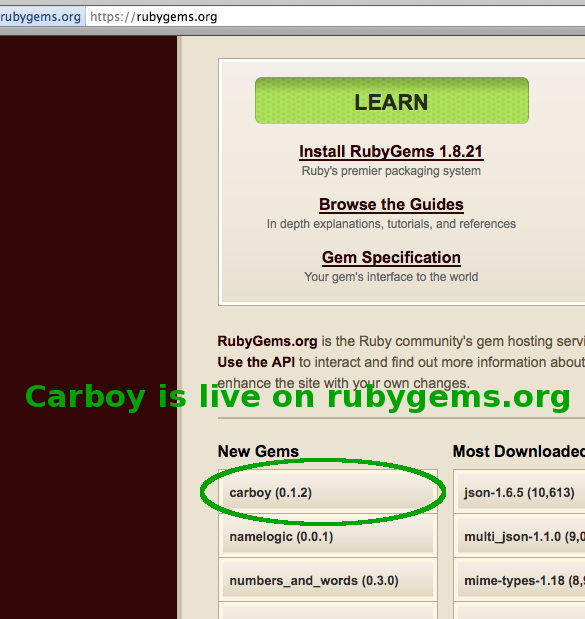
Carboy 0.1.2 is out in the wild

After learning a bunch about Homebrew for mac, I decided to do a talk at ruby.mn on the subject. As I was working up to sharing what I'd learned about writing Homebrew formulae, I decided, "hey, there's a pattern to this that I should just wrap up in code instead of just write about it..."

Thus, carboy was born. Homebrew is in reference to home brewing of beer and a carboy is an important part of any homebrewer's toolkit. Here's a library that, if included in your rakefile, gives you some valuable build functionality for creating installs for homebrew. I have released preliminary versions of it to github and rubygems.org

https://github.com/bikeonastick/carboy
https://rubygems.org/gems/carboy


For information on how to use it, read the simple steps 1-10 in the README for carboy on github. Step 0 is assumed, but if you need it, you need it. There's also an example included within carboy called my-tools. Look at that for more info.

I'll be speaking at ruby.mn about carboy on Monday 26 March 2012. Well... I was pretty vague when I signed up to speak, which was before I made the jump from telling folks what I learned about developing for homebrew to writing carboy. Oh well...

One last thing for those of you interested in writing your own Homebrew formulae. Here were some good resources:


16 March, 2012

today's awesome parking spot

more awesome perks for the new job. when the bike's clean, i can park right by my desk!

sweet new bartape

ready to do THIS commute!

12 March, 2012

family vacation

a few minutes before we sent the kids off for a day-long lesson at ski school and we went out in search of some fun runs.

11 March, 2012

finally, some snow

almost to breckenridge and finally seeing snow on the mountains!

09 March, 2012

a dry hopped barleywine

from avery brewing in colorado...  (preparing for my trip to breckenridge)

as close as you get to cubicle in this place

a new employee starts monday and we're uncrating (some of) his new office stuff.

06 March, 2012

these minneapolis bikeracks were made for my bike!

these are perfectly sized for a krypto evolution mini and my bike. gottaloveit...

04 March, 2012

antiseize is your friend

especially when it's drivetrain swapout time of year on the foulweather commuter bike.

02 March, 2012

snowy, warm, and sunny commute

warm enough to pull a glove off to take a few in-flight photos.

craziest tulip bouquet ever

bought some flowers for my wife last week and i think i left too much stem for the vase. they've been striking crazy poses all week.

28 February, 2012

frozen buckles

made it home in a winter rainstorm with dry and warm feet (thanks to the geniuses at endura and the sock scientists at smartwool). by the time i made it home, i was coated with ice. here's the buckle of my bag waiting to thaw so i can get my computer out of my nicely waterproof r.e.load bag.

04 February, 2012

frosty morning

everything looked angry and...
potentially a prop for a tim burton movie...
but when the frost fell, it looked like thorns on the ground.

21 January, 2012

macvim dev env update

ok, so i've mentioned that i'm revisiting vim as a dev tool and, quite frankly, i've been impressed with some of the plugins out there. i've been using NERDTree and the grails plugin. NERDTree has been very nice and the grails one is ok.

as i've been watching grails webcasts like bobby warner's jump into grails 2.0, i've been a little jealous of textmate's ability to "find files." so i started searching for a vim plugin to do the same and found command-t. it's pretty cool. as i've mentioned before, i've been doing a few things with keymappings to make macvim act the way my fingers need it to work. i had to add a little magic to my .gvimrc to make it work for me.

macmenu &File.New\ Tab key=<nop>
map <D-t> :CommandT<cr>

now, command + t enables the file finding feature of the command-t plugin.

20 January, 2012

plowed bike path

wow, snowed this afternoon and the city of roseville had the bike paths plowed by tthe time i rode home. those are MY tax dollars at work.

18 January, 2012

have a ball

of soup! literally, a ball of soup! my frozen soup thawed from outside in, leaving a baseball-sized frozen chunk in my bowl.

17 January, 2012

keymappings for mac vim

thought i'd share... i hate the goddamn keymapping of command+W closing mac vim. i can't seem to get my fingers to actually use control + W + [h,j,k,l] when i want to move to a different pane in vim on the mac, so i have a tendency to hit command + W, which has horrible consequences in mac vim. ugh! anyway, after digging around i found info on how to remap some keys. i now have remapped all my vim pane navigations in mac vim by adding the following to my .gvim file:


if has("gui_macvim")
        macmenu &File.Close\ Window key=
        macmenu &File.Close key=
        nnoremap <D-w>h <C-W>h        
        inoremap <D-w>h <C-W>h       
        nnoremap <D-w>l <C-W>l        
        inoremap <D-w>l <C-W>l       
        nnoremap <D-w>j <C-W>j        
        inoremap <D-w>j <C-W>j       
        nnoremap <D-w>k <C-W>k        
        inoremap <D-w>k <C-W>k       

endif

so, i guess you want this in a .gvim file because .vim file options are loaded first and macvim then puts all of its mappings on top of that. if you add these to .gvim they are preserved.


my understanding of how i needed to put this in the .gvim file as opposed to the .vim file came from this posting on superuser.com.

08 January, 2012

fried egg sandwich topped with black bean chili and cheese

when i said what i was making, my wife asked, "are you pregnant?"

the dog asked, "can i have some?"

it was great

26 December, 2011

running a simple rails app (like wagn) with ubuntu upstart


I had a hell of a time getting my upstart script to start. It kept launching, reporting that it started and even showing a pid, but it would die. This was a version of the same script I had written in a shell script and it would execute just fine. The addition of the export HOME, suddenly made things come together.

I'd been chasing the various values in the expect stanza, but nothing made sense. Once I had the HOME export in place, I was able to find the right setting for the expect stanza after a couple of tries.

Anyway, I wanted to run a very simple rails app, called wagn, as an internal tool on an internal server. In the event that our box goes down, I want wagn to restart. Furthermore, I don't have a bunch of time to muck about with all of those full-on production ways of deploying ruby, so I went looking for the best way to run this on the platform I had in front of me. I found out the new way of running services on ubuntu is through upstart.

After looking through a bunch of things on upstart:

I found a hint... well, something I hadn't tried yet. Anyway, upstart seems to need a HOME var set when you execute. So, if you've been searching, here's a good example to go on if you want to run a rails server with upstart. You can create something similar to the following in /etc/init/servicename.conf. If you are using it specifically for wagn, edit my path below to match your install location for wagn.

# example script offered with NO WARRANTY. 
# feel free to use it or just learn from it

# wagn-server - wagn-server job file
description "wagn server"
author "robert tomb"

# restart process if crashed try 10 times every 5
seconds
respawn
respawn limit 10 5
# let upstart know the process will detach
expect daemon

# When to start the service
start on runlevel [234]

# When to stop the service
stop on runlevel [016]

# don't know why but home=root is necessary
# found it here: http://kevin.vanzonneveld.net/techblog/article/run_nodejs_as_a_service_on_ubuntu_karmic/
script
   export HOME="/root"
   exec /usr/local/wiki/wagn-1.7.0/script/server -b 192.168.1.54 -e production -p 3000 -d > /var/log/wagn.log 2>&1
end script

24 December, 2011

the squashes are stuffed

and placed in the baking dish with care...

we're hosting christmas for t's family and she asked me to make little stuffed squash for everyone. the rice, honey, butter, raisins, craisins, cashews, cloves, cinnamon, and nutmeg have been mixed and the squashes are ready to go in the oven.

--rt

14 December, 2011

Hate bat scripting? Me too...


Abstract
Hate BAT files? Yeah, so do I. Stuck on windows for reasons beyond your control but need to do some scripting? Sure, you can use perl, ruby, python or jruby, but all of those require the installation of an interpreter.

How do you survive if you have a bare-metal windows box and aren't allowed to dictate prerequisites? You could fall back on bat scripting and risk the integrity of your hairline or you could fall back on your JavaScripting skills and go against the WSH.

I'll show you a couple of minor examples in a JS coding idiom that makes sense to me and share as many of the references as I remember that helped me with my code. Lastly, I'll give a few suggestions as to where this can be used. Hopefully, this will be enough to spur your imagination to use JavaScript solve problems you have on the windows platform.

Windows Scripting Host
Here's your goto microsoft site for this http://msdn.microsoft.com/en-us/library/9bbdkx3k.aspx . This site is going to give you all of the conceptual stuff you need to know about this. I'll talk about some things I had to reconcile and give you a codesample walkthrough.

Executing your scripts


  1. just execute a js script from the cmd line
    jsmn_all.js
  2. execute it from the command line with cscript
    cscript /Nologo jsmn_all.js
  3. create a .wsf file to define and execute it with cscript
    cscript /Nologo jsmn.wsf
  4. or just execute your wsf file from the command line
    jsmn.wsf
wsf? WTF?
Go here for info on wsh files. Basically, they offer the ability to define a script and do imports, similar to what you do in an html file with

I'm not going to get too far ahead of my self decomposing this entire script. Suffice it to say that this allows you to connect to jsmn.js and use things in it, such as the ScriptHelper object. Objects that are part of the windws scripting host, e.g., the WScript object are going to be in your execution scope no matter what, so there's no need to root around for some WSH javascript file to "include."

You can have multiple script references, but I don't know the limitations. You can even have your script entry point in one of the referenced scripts. I can see where it might make better sense (and make your editor of choice happier) if you put all logic in a js file and only used hour WSH file like a project file.

What can you do with this here WSH thingy?
Good question. Well, I have a progressive "hello jsmn" demo for you that might help to enlighten. You'll really have to dig through the Microsoft pages to see all that you can do. You can even use this to wrap windows commandline commands.

I see it as a great way to drop a toolkit onto a bare metal windows box and make yourself productive. Seems like something that could be very powerful for sysadmins or testing engineers especially for windows VMs.

Oh yeah, the demo
  

Running just this with no Arguments yields a dialog box with:Needs two arguments: one to specifiy the subject and another for desired action. Here's the ScriptHelper class we instantiate and call methods from:

/*
 * Class for grouping functions that are important to this script.
 */
function ScriptHelper(word1,word2) {

    this.desktopiconfolder = "";
    this.envname = "jsmn";
    this.write_script;
    this.fullFileName = WScript.ScriptFullName;

    this.wshShell = WScript.CreateObject("WScript.Shell");
    this.objFSO = WScript.CreateObject("Scripting.FileSystemObject");

    this.wordOne = word1;
    this.wordTwo = word2;

    this.speak = function() {
        WScript.echo(this.wordOne + " " + this.wordTwo);
    }

}

That's all well and good but...
I'd like to do something slightly more sophisticated than just echo some crap out

So, let's write to a file. I'll add a speakToFile function to my ScriptHelper class


this.speakToFile = function(loc) {

        this.write_script = loc;

        var filelocation = loc;
        if ( this.objFSO.fileExists(filelocation) ) {
            this.objFSO.moveFile(filelocation,filelocation + ".bak");
        }
        var ForWriting = 2;
        propFile = this.objFSO.OpenTextFile(filelocation,ForWriting,true);
        propFile.WriteLine("WScript.echo('from file:" + this.wordOne + " " + this.wordTwo + "');");
        propFile.Close();
    }

 and tell my WSF file to call that instead of speak.
  
Now, when I run

jsmn.wsf hellooooo jsmn

it writes a file to disk called jsmn_write.js. This file contains one line of javascript and if I execute jsmn_write.js, I'll see

"hellooooo jsmn"

So, I can write a file, what else?
There's all sorts of windowsey stuff you can do like write shortcuts... So, I add a call to a createShortcuts() method

And, this takes a few more methods to support it, but I add the following methods to ScriptHelper

this.createShortcuts = function() {
        this.createShortcutFolder("Shortcuts for " + this.envname);
        this.createShortcut("TestShortcutFor-" +
                this.envname,this.getScriptDir()+"\\"+this.write_script,this.env
name);

    };

this.createShortcutFolder = function(name) {
        var desktop = this.wshShell.SpecialFolders("Desktop");
        this.desktopiconfolder = desktop + "\\" + name;
        this.objFSO.CreateFolder(this.desktopiconfolder);
    };

this.getScriptDir = function() {
        var forShortening = this.fullFileName;
        var lastSlash = forShortening.lastIndexOf("\\");
        var shortened = forShortening.substring(0,lastSlash);

        return shortened;
    };
    this.createShortcut = function(linkName,tgtPath,args) {
        var myShort = this.wshShell.CreateShortcut(this.desktopiconfolder +
                        "\\"+linkName+".lnk");
        myShort.WindowStyle = 1;
        myShort.TargetPath = tgtPath;
        myShort.Arguments = args;
        myShort.Save();
    };

Now when I run

jsmn.wsf hellooooo jsmn

I get a shortcut folder on my desktop with a shortcut in it that has a link to jsmn_write.js. That's it for my demo, I hope it was simple enough to follow but sophisticated enough to give you some ideas for new ways to use your javascripting skillz.


Debugging?
cscript has an option for a debugger, but I have not successfully used it.
//X         Execute script in debugger
NOTE: I will research this further and update or write a new entry on this

Soo... What else is possible?
Unit testing is pretty cool and if you're developing some sort of a toolkit with WSH scripts, you might want to be able to build them with TDD or just have some tests to prove that your code doesn't toally suck. I have not tried either of these, but they look very promising:


The next time someone tells you that JS is a toy language and you can't do anything with it, you can tell them to kiss your asterisk.

Acknowledgements
Also, this post uses the awesome syntax highlighter from alex gorbatchev it's some pretty cool javascripting in its own right.

24 November, 2011

be sure to look for our results when they're posted

getting up early to run the turkey day 5k as a family. i can't wait until they post the race resultz. lookz likez we're all winnerz.